


OSOYOO 5 Inch DSI Touch Screen for Raspberry Pi 5 4B 3B 3B+ 2 with Portable Mount Stand Holder
OSOYOO 5 Inch DSI Touch Screen for Raspberry Pi 5 4B 3B 3B+ 2 with Portable Mount Stand Holder
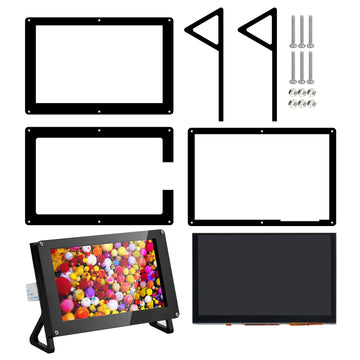
The OSOYOO 5-inch DSI touch screen with portable mount stand holder: a 5" 800×480 DSI display in a protective case with a stand, ready for desk use. It connects to your Raspberry Pi through the DSI port — one cable carries the display signal, the touch signal, and power — so it uses no GPIO pins, no HDMI port and no USB port, and all 40 GPIO pins stay free for your own DIY projects.
Why this bundle
- Desk-ready with stand and case: the portable mount stand holder sets the screen at a comfortable viewing angle, and the case protects the display — ideal for a desktop dashboard, control panel, or portable Pi workstation.
- One cable does it all: display, touch, and power travel over the single DSI ribbon cable.
- No GPIO occupied: unlike SPI screens, it does not use the SPI bus or any GPIO pins.
- No HDMI needed: the same clarity as an HDMI screen, without taking the HDMI port and without any HDMI licence cost.
- Large touch area: 10-point capacitive touch (Raspberry Pi uses 1 finger), 800 × 480 resolution with 24-bit colour and a sharp, clear picture.
Features
- 5" LCD with 800 × 480 physical resolution, 24-bit colour
- 10-point capacitive touch (Raspberry Pi uses 1 finger)
- DSI interface connects to the Raspberry Pi board, including power
- Virtual resolution adjustable from 800 × 480 up to 1920 × 1080
- Strong anti-interference, ultra-low power consumption, ultra-long-distance lossless transmission, automatic sleep when not in use
- Portable mount stand holder and protective case included
Specifications
- Display: 5" LCD, capacitive touch
- Physical resolution: 800 × 480, 24-bit colour
- Touch: 10-point capacitive (1 finger under Raspberry Pi)
- Interface: DSI (MIPI), including power
- Product dimensions (with case): 147 × 103 × 31 mm
What's in the box?
- 1 × 5" DSI touch LCD screen for Raspberry Pi
- 1 × case for 5" DSI screen, with portable mount stand holder
- 1 × user manual
Please note
- Due to the Raspberry Pi system, touch-point accuracy can vary: icons at the very border of the screen may occasionally not respond to touch.
- Setup follows the 5-inch DSI touchscreen tutorial linked below: connect the DSI cable, insert a micro SD card with your OS image, and power on — no driver installation is needed.
- Make sure your micro SD card has enough space for the system image, and do not touch your Raspberry Pi board while power is on or when your hands carry a static charge.
Shipping cost is based on weight. Just add products to your cart and use the Shipping Calculator to see the shipping price.
We want you to be 100% satisfied with your purchase. Items can be returned or exchanged within 30 days of delivery.
Frequently Asked Questions
Where can I find tutorials for this product? +
Free tutorials and sample code are available at osoyoo.com. Search by your product model number to find step-by-step lessons.
Do I need to solder anything? +
Most OSOYOO kits are plug-and-play with no soldering required. Check the product description for specific assembly requirements.
How do I get technical support? +
Contact us at support@osoyoo.com. We reply within 24 hours on business days and provide free support for all OSOYOO products.
